VirTimePlace User Manual
Everything you need to know to use the platform and enjoy the metaverses.
A. Access to the VirTimePlace platform
Access to this platform and its metaverses is completely free for all visitors (see the project page). However, although it offers free information and demo content, an active participation requires creating a user account.

A.1 Terms and Conditions of Use
The user acknowledges that:
- The platform play.virtimeplace.com is designed as a completely free service for visiting users; under no circumstances will the platform request sensitive personal data or process payments. It is up the user to report any incident that violates this policy.
- The platform that supports the activities is an IT system connected to the internet and, as such, is susceptible to issues common to such systems, including: network congestion, system outages, freezes, operational or coding errors, and deliberate attacks that could lead to data loss or unauthorized access.
-
The personal data stored consists of: email address, first and last names, year of birth, and postal code. For certain activities, location data is also recorded. No data concerning political, sexual, or legal status—which could compromise the user's digital integrity—is collected. Only the email address is validated; therefore, the accuracy of other personal data is at the user's discretion. However, it is recommended to provide accurate information to ensure proper identification by other users and the platform itself.
First and last names are required to identify participants during activities. Year of birth and postal code allow for the filtering of activities—where age or geographic origin are relevant—and are used for statistical reporting. Location data is also required for geolocated activities. -
The standard operation of the service allows all user-to-user communication to take place using a public alias or nickname. Nevertheless, there are three scenarios in which personal data may be revealed on the platform:
- If the user chooses to share such information via the chat—a practice that is discouraged and remains the sole responsibility of the user.
- If a host user requires such information as a condition for accessing their metaverse. Accepting an invitation constitutes the user’s express authorization for the host to access the requested data; the host bears sole responsibility for any subsequent use of such data
- Regarding deliberate attacks: The VirTimePlace platform neither contains nor requests sensitive data; however, the possibility of cyberattacks cannot be ruled out. Our primary safeguard is that the data holds no value for malicious actors; nevertheless, VirTimePlace assumes no liability for the fraudulent extraction of data.
By participating in any activity on the platform, the user agrees to the following:
- Their data may be shared with the host under the circumstances outlined previously
- Their statistical data (year of birth, postal code, and location during activities) will be used for activity tracking and the preparation of statistical reports.
-
The service is provided free of charge and is subject to unforeseen technical issues; consequently, the user waives any right to make claims arising from their use of the service.
Furthermore, the user agrees to the platform’s privacy policy.
A.2 Technical Requirements
VirTimePlace is a software platform that can be accessed on the internet using browsers that support WebGL2 (recent versions of Chrome or Firefox are recommended); however, due to the vast range of possible system configurations, compatibility cannot be guaranteed. In general, the following devices are considered compatible:
- Desktop PC or laptop from 2016 or later, with at least 8GB of RAM and a compatible graphics card.
- Android mobile devices from 2020 or later, with at least 6GB of RAM and hardware-accelerated graphics.
- iOS mobile devices (not yet tested).
- VR headsets (a list will be provided in a future update).
B. Access to metaverses
There are 2 modes of access to a metaverse:
- Solo trip 🚶. You can walk through the 3D space without participating in shared activities.
- Social 🚌. It allows interacting with other users and participating in activities.
B.1 Access for anonymous users
A non registered user can only access demo metaverses using Solo trip mode.
B.2 Access for registered users
Each metaverse is a publication offered by a host on the platform and, as its owner, he decides whom to invite, through 3 access mechanisms and 1 special case:
1. Public access with admission control
-
1.a. All metaverses shown in the catalogue are public and any visitor can request an invitation. Just ring the bell

-
1.b. Once the request is made, the host decides whether to grant or deny it. You only can wait

-
1.c. If the host invites you, you will see an orange entry door. You must click it to confirm your attendance, accepting the participation conditions.

-
1.d. If your request is denied, you will see the denied symbol

-
1.e. When you confirm your participation, the icon changes to a green entry door. If you click it, you enter the metaverse lobby directly: a page with information and access to both Solo trip and Social modes.

-
1.f. You will also see a red exit door to cancel your participation. If you click it, your data will remain in the host's records but you will lose access to the metaverse and will have to request a new invitation if you wish to return.

2. Free public access
The admission-control process is suitable for a teacher or a business targeting a specific profile of guests, but for large events or institutions it can be cumbersome.
If the host has enabled free access for their metaverse, it will show the confirm symbol directly in the catalogue. Just click it to confirm your attendance, accepting the participation conditions.
3. Private access
A private metaverse is not shown in the catalogue. The host will provide guests with a private access code that must be entered on the private catalogue link Private catalog.
Only if the code is correct will the metaverse be added to the private catalogue (with or without free access).
4. Special access (Pro hosts only)
For massive events, there is a third way that extends the previous mechanisms.
When a user registers in the system, he can set a visitor code whose purpose is to facilitate contact with hosts.
A host can provide a common visitor code for all visitors participating in the event. At some point the host system will assign invitations and teams linked to each code automatically.
If you are invited to a massive event and given a visitor code to join a team, use that value in your user profile and, when the host assigns the teams, you will be invited to the metaverse and added to the team linked to that code.
C. Metaverse navigation interface
When you enter the metaverse you will see a loading screen with a clock. When loading finishes, click on the clock and you will see a screen similar to this one:
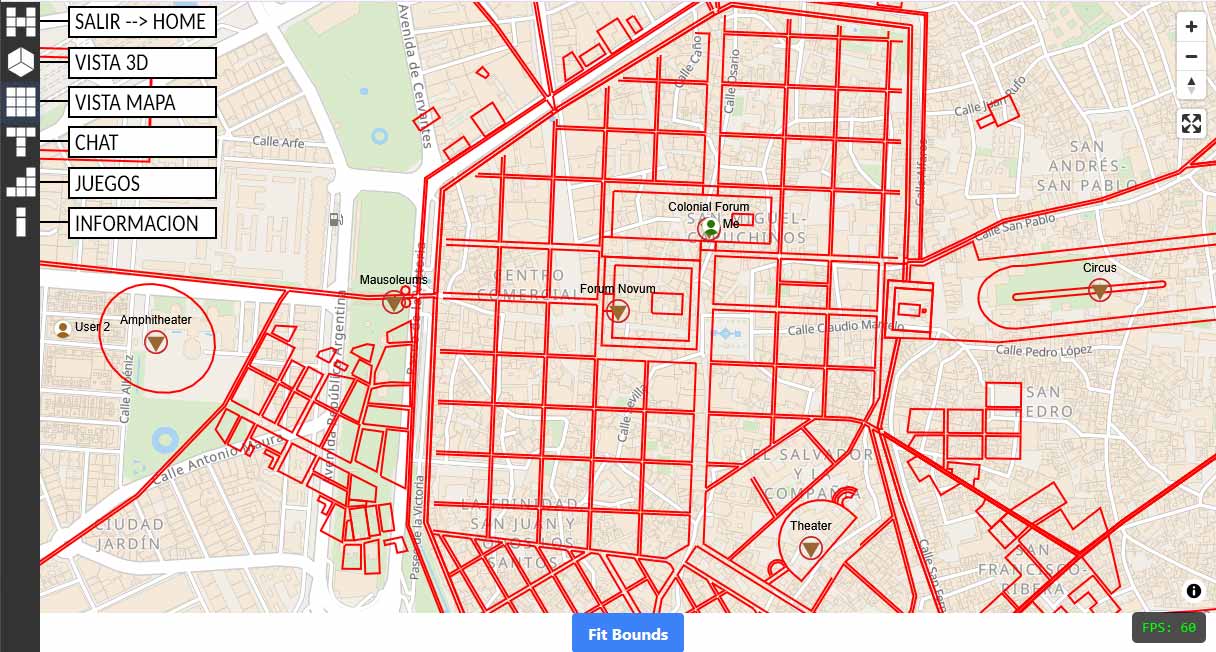
Use the menu icons to access the different sections:
- EXIT: It will ask for confirmation to disconnect you from the metaverse and take you to the project page.
- 3D VIEW: Shows the 3D world and the movement controls.
- MAP VIEW: Shows the map of the 3D world, geographically referenced.
- CHAT: If your host enables it, you can chat with other users.
- GAMES: This is where you manage your participation in the metaverse games.
- INFORMATION: Shows calendars and notes of interest.
C.1 Navigation controls in the 3D world
Regarding movement and orientation, there are 2 types:
Manual controls
Except for the elevation slider, they have no visual representation. Simply press and drag on the bottom-right part of the screen to move, and press and drag on the rest of the screen to look around.
Automatic controls
🧭 enables and disables automatic orientation.
📍 check GPS location, which will be required in on-site activities.
D. Playing games
DEMO NOTES: In demo metaverses, your participation data is deleted, and you start from scratch in every session. This is the intended behavior for learning the mechanics of games.
How to participate in a gymkhana?
The host sets a start and end date, which you can check in Información-Calendario de juegos.
When the start date arrives, you can begin your participation in the games section. Once the game has started, you must follow its instructions.
D.1 Gymkhana
A gymkhana in VirTimePlace is a competition in which participants, divided into teams or individually, must overcome a series of challenges of wit, skill or knowledge along a route, with the particularity that the route takes place over the 3D world of the metaverse.
This activity requires following a specific route through the visited city to overcome the different challenges.
Instructions
- Press Start checkpoint search. At that moment the checkpoint is activated and the search timer starts.
-
To locate where the checkpoint is, open the map and find its icon
 .
-
Once you know the checkpoint location on the map, switch to 3D View and move:
- 3.a. For a virtual gymkhana: use the controls to reach the checkpoint location and click it.
- 3.b. For an on-site gymkhana: physically move to the place and press 📍 so the app validates your position and allows you to click the checkpoint.
-
Activating the checkpoint will enable the different challenges to complete at that point in the Games view. Practising in the metaverses is recommended to get familiar with the mechanics of the challenges, which may be:
- Quiz.
- Puzzle.
- Word matching.
- Once the challenges of a checkpoint are completed, the start button for the next one will be enabled.
Scoring notes
The scoring scale may vary from one metaverse to another depending on the host, but the same rules always apply to all participants and always comply with the following:
- The time elapsed from the activation of a checkpoint to its click, as well as the time to complete the challenges, is evaluated. The shorter the time, the more points.
- Each player's result is the sum of all the scores obtained in the challenges performed.
- In a team competition, each team's result is the average of all its participants.
D.2 Hide & Seek
A game that consists of eliminating the opponent of the match by clicking on their avatar.
Instructions
Each player must hide as well as possible so as not to be seen and, in turn, try to locate the other players.
If you manage to get close and click on an opponent, you will earn a point and the opponent will lose it.
E. Events
A VirTimePlace event is a collection of activities that offers access to more than one metaverse.
It can be accessed via a personalized link (for example, https://play.virtimeplace.com/hub/cordobaromana26) and through the Events tab in the main menu..
It is useful for centralizing access to the offered metaverses, but the invitation policy remains. An invitation—whether automatic or supervised—is required for registered users to gain full access. Simply follow the instructions provided..
If the user is not authenticated, they will only be able to access demo metaverses as a solo traveler..